handwrite hanzi
Learn to write Chinese characters by hand. A fresh practice sheet lands every morning for your e-ink tablet or iPad, and spaced repetition brings each character back just before you'd forget it.
sign in with googlepick your level
HSK 1 to 6, or 提笔忘字 native refresh for characters you can say but have forgotten how to write.
every morning, a fresh sheet
At 06:00 your PDF is ready: up to 20 characters. Characters you're due to review come first, then up to 5 new ones if there's room. It's an ordinary A4 PDF: open it on any e-ink tablet or iPad that lets you write on a PDF. If you connect Google Drive, it's waiting in a folder there.
write from memory, then check
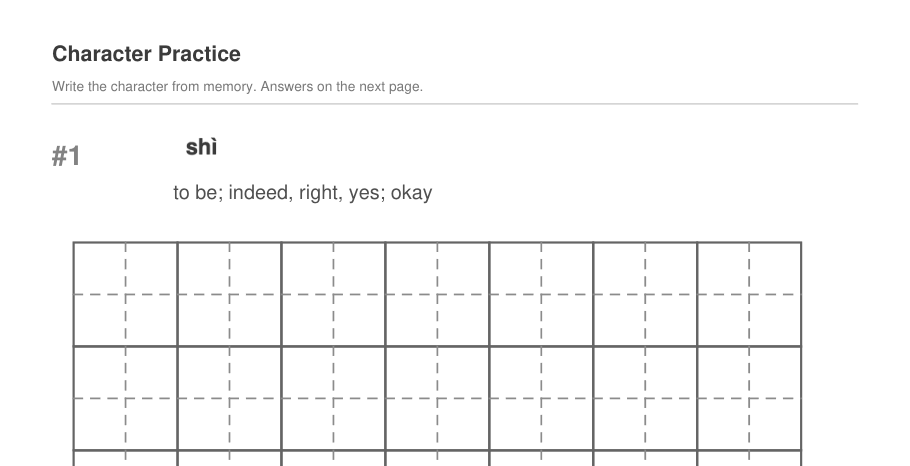
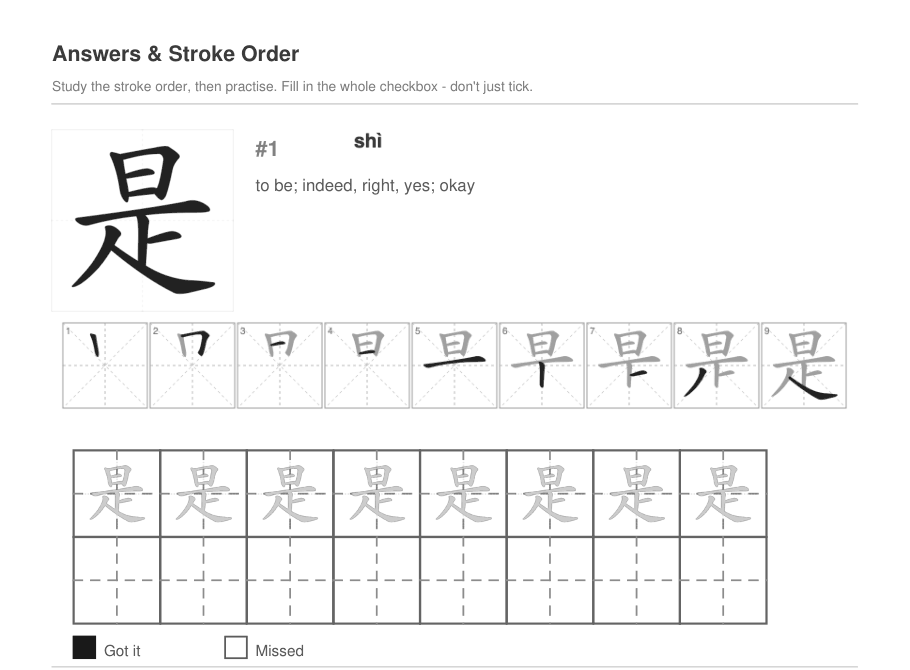
Each question page gives you the pinyin and meaning. Write the character in the grid. Turn the page to see the answer and its stroke order, then fill in got it or missed.
send it back
Email the finished PDF from your tablet to upload@handwritehanzi.com, or upload it on the upload page.
The app reads your boxes and schedules every character: get it right and it comes back in 3 days, then 6, then longer and longer.
Miss it and you'll see it again tomorrow.
bonus sheets
Score 90% or more and you can do another sheet the same day. It's the fastest way through a backlog, and new characters come sooner.
can I print the sheet instead?
You can print it to practise, but the app can only read results from the PDF itself, written on with a tablet. A scan or photo of a printed sheet won't be read.
which tablets work?
Any that can open a PDF, let you write on it, and email or upload the result. Sheets are standard A4, so they fit any screen.
I didn't fill a box in. What happens?
After you upload, the app shows any characters it couldn't read and lets you choose got it or missed.
I made a mistake. Can I upload again?
Yes. Uploading the same sheet again replaces its earlier results.